Your AI chief of staff for Claude Code
You make the calls.
Chammo runs the team.
A desktop app for macOS and Windows that starts a Claude Code session per project, hands out the work, and comes back to you only for the calls that can't be undone.
macOS 14+ on Apple silicon · Windows 10/11 preview · Free and open source
Build the shop landing page, and look at the checkout bug too
I'll split this three ways
This fixes checkout rounding. OK to send?
Sessions
Build the shop landing page, and look at the checkout bug too
Splitting it three ways. Anything that touches payments, I'll ask you first.
Sent to coffee-landing · pixel-blog · acme-shop waiting for you
Decisions 1
This fixes checkout rounding. OK to send?
How it works
You ask your chief of staff
You talk to one live Claude Code session — by voice or by typing.
It hands out the work
It starts a Claude Code session per project, delegates, follows up and reports back in one line.
Only the calls come to you
Payments, production changes and security land in the decision inbox under the bell.
Five ways to work with Chammo.
-
01
Several chiefs of staff, each with a name and a role
Give each chief of staff a name and a role like "development" or "design". They see each other's roles and hand work to the right one.
-
02
Ask for new work, get a project
The chief of staff names and creates a project folder with CLAUDE.md, docs/starter.md and docs/roadmap.md that each session reads first and updates when it finishes.
-
03
Chammo modes PreviewComing in 0.2.7
A launch checklist, an order board, a button that runs a routine — ask the chief of staff and it builds the mode, then Chammo draws it as a real panel: in its own window, on the side, in a dashboard slot or full screen. Needs Claude Code 2.1.287 or later.
-
04
Its look and its voice
Pick each chief of staff's shape, color and voice. You can change them from your phone too.
-
05
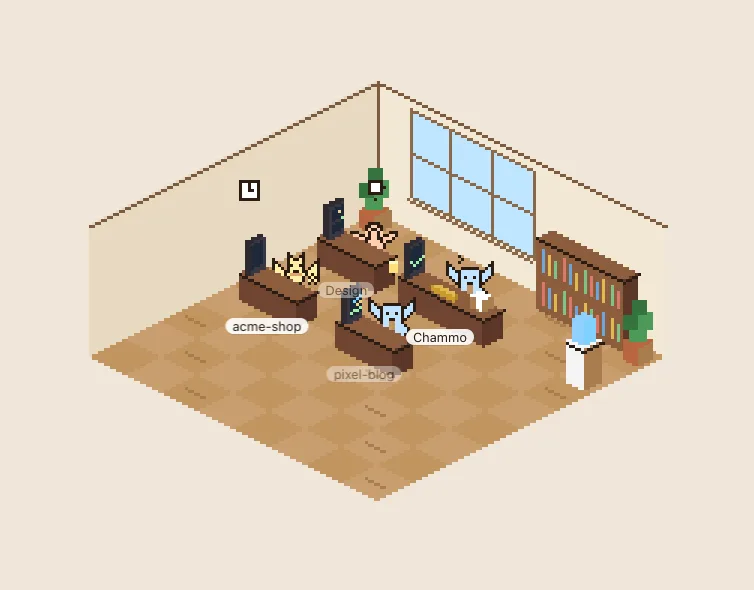
A pet, a capsule machine and a pixel office
Extras that make the work look cute: a pet that grows from your commits, PRs and CI runs, a capsule machine fed by coins from merges, and a pixel office where every session works at a desk. Each can be turned off.
A day with Chammo
One session per project
Each project gets a real Claude Code background session. Open any of them and take over at any moment.
Safe changes merge themselves
Once CI is green, the chief of staff merges what is safe. Anything merged today can be reverted with one click.
Routines run overnight
Recurring work like "post to the blog every morning" runs on schedule, even when the app is closed.
Only the calls come to you
Payments, production databases and security land in your decision inbox. Your reply goes straight to the session that asked.
This fixes checkout rounding. OK to send?
Here's what it really looks like.
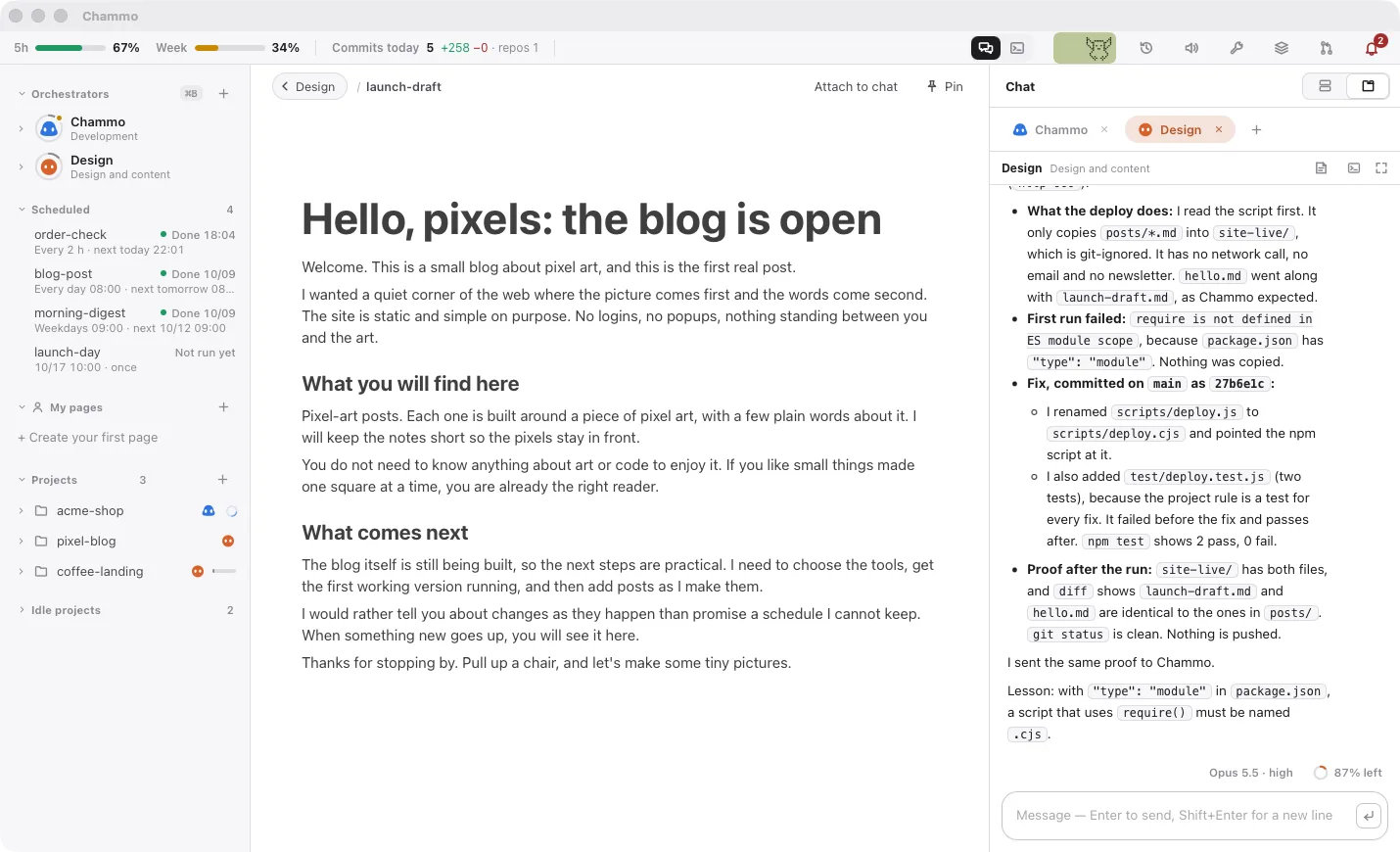
And also.
On your phone
Pair a phone with a QR code to talk to your chief of staff and answer decisions on the go.
A browser per project
Each project gets its own logged-in browser, and you can watch it live inside the app.
Session revive
When sessions go down, Chammo brings them back with their conversations.
Routines
Recurring work, or a one-off at a date and time you pick, runs on schedule even when the app is closed.
Questions
Is it really free?
Yes. Chammo is open source under AGPL-3.0 and the app itself is free. Model usage goes through your own Claude plan (Pro, Max, …).
Does it use my own Claude login?
Yes. Chammo does not log in to anything; it uses the Claude Code login already on your computer. Every session is a real Claude Code session you can open and type into at any moment.
Where do my code and conversations go?
Chammo runs entirely on your computer. It has no server, no account and no telemetry — model traffic is Claude Code's and GitHub traffic is gh's, with your own logins. Only features you turn on yourself, like Telegram, go through that service.
What do I need to run it?
A Mac with Apple silicon (M1 or later) on macOS 14 or later, or a Windows 10/11 x64 PC (preview). Things like Xcode Command Line Tools and Claude Code are checked on first launch and installed with one button.
Windows says "Windows protected your PC".
The Windows installer is not code-signed yet, so SmartScreen may warn you. Click "More info → Run anyway". Mac DMGs are notarized by Apple and open with a double-click.
Do sessions act without asking me?
Background sessions run without asking. Chammo's gates hold payments, production steps and PRs that touch money or security until you answer. Only use it on projects and machines where you're comfortable with that.
Is this made by Anthropic?
No. Chammo is an independent project by Honor Studio. It is not affiliated with, endorsed by, or sponsored by Anthropic. Claude and Claude Code are trademarks of Anthropic.
Get your chief of staff.
Mac: Apple silicon, macOS 14+ (DMG) · Windows 10/11 x64 preview (installer) · A Claude account
Runs entirely on your computer. No server, no account, no telemetry.
Chammo is a desktop app for Mac and Windows. Open this page on your computer to download it.
View the source codeNice work today.